Showing posts with label oracle. Show all posts

Monday, September 7, 2020

Oracle Integration /ICS/OIC Connection Credential Replace automated


The requirement was to do a find and replace connection credential in OIC .


There can be a scenario where the credentials in the connection that are setup in OIC expires and the security teams reset it to a different password.

It is difficult to know which connection is using that credential which needs to be changed.


We are achieving this using the rest APIs exposed by OIC to fetch and update the connection details.


Step 1 : Use the shell script in URL


It accepts 4 Parameters : 

ICS_CONNECTION_URL= https://xxxx-dev-xxxx.integration.ocp.oraclecloud.com

OIC_USERNAME= abc@oracle.com

OIC_PASS= welcome

replaceuser= This is the user you want to find and replace. - 123@oracle.com


Change the connection details in CONN.json file :


Step 2 : Load the shell script in a unix box with CONN.json which you want to load.


./main.sh "https://xxxx-dev-xxxx.integration.ocp.oraclecloud.com" "abc@oracle.com" "welcome" "123@oracle.com"

This will run the script.


Once you run the script , this will generate a file connections.txt which will contain all the connections replaced.


Shell Script (You can also find the same in git attached above) :

ICS_CONNECTION_URL=$1
OIC_USERNAME=$2
OIC_PASS=$3
replaceuser=$4
if [ -f "user_accounts.txt" ]
        then
           rm user_accounts.txt
    fi
if [ -f "connections.txt" ]
        then
           rm connections.txt
    fi
 #curl -k -v -X GET -u $OIC_USERNAME:$OIC_PASS -H Accept:application/json  $ICS_CONNECTION_URL/ic/api/integration/v1/connections?q={status:%27CONFIGURED%27} -o curl_result 2>&1 | tee curl_output
     curl -G -X GET -u $OIC_USERNAME:$OIC_PASS -H "Accept:application/json" --data-urlencode "q={status:  'CONFIGURED'}"  $ICS_CONNECTION_URL/ic/api/integration/v1/connections -o curl_result 2>&1 | tee curl_output
    Integr_count=$(jq '.items | length' curl_result )
for ((i=0; i < $Integr_count; i++))
               do
                err_message=""
               #Obtain the Integration artifacts from file
               id=$( jq -r '.items['$i'] | .id' curl_result )            
  
curl -X GET -u $OIC_USERNAME:$OIC_PASS -H "Accept:application/json" $ICS_CONNECTION_URL/ic/api/integration/v1/connections/$id -o curl_result_conn 2>&1 | tee curl_output_conn
            name=$( jq -r '.securityProperties[0] | .propertyName' curl_result_conn )
     value=$( jq -r '.securityProperties[0] | .propertyValue' curl_result_conn )
            
echo "$id | $name | $value">>user_accounts.txt
  if [ "$value" == "$replaceuser" ]
then
curl   -X POST  -u $OIC_USERNAME:$OIC_PASS -H "X-HTTP-Method-Override:PATCH" -H "Content-Type:application/json" -d @CONN.json $ICS_CONNECTION_URL/ic/api/integration/v1/connections/$id -o "curl_result_conn_$id" | tee "curl_output_conn_$id"
              # filenm=curl_output_conn_$id
             int_status=$( cat "curl_result_conn_$id" | jq -r .status ) 
    echo "*********$id   $int_status*********"
          if [ "$int_status" == 'CONFIGURED' ] 
  then
   echo "Connection Activated successfully"
   echo "$id | SUCCESS" >>connections.txt
  else
   echo "Failed while Updating the connection"
               echo "$id | FAILURE" >>connections.txt
          fi
fi

done
echo "*******************DONE !!!****************"


Wednesday, April 1, 2020

Finding distinct in Oracle OIC - Oracle Integration Cloud / ICS

There is no function available in Oracle Integration Cloud to find distinct of node values.

distinct function can be used in xsl , but that can be done from backend only which may invalid the mapper sometime.

We can use the following to get rid of repetitions / find distinct.

This needs to be applied in the xsl . Will post the examples shortly.

[not(nsmpr7:LOC=preceding::*)]


$StageRead/nsmpr2:ReadResponse/nsmpr4:RecordSet/nsmpr4:HeaderRecord[not(nsmpr4:SequenceNumber=preceding::*)]  --> This will pick HeaderRecord for distinct SequenceNumber

$ReadInChunk/nsmpr4:ReadResponse/nsmpr7:RecSet/nsmpr7:Rec[not(nsmpr7:LOC=preceding::*)] --> This will pick HeaderRecord for distinct LOC

Thursday, November 14, 2019

Inventory Inquiry in Oracle Order Management Cloud OMS - CWInventoryInquiry


Inventory Inquiry in Oracle OMS :
Asynchronous.

We were initially struggling on how to fetch the inventory details for an Item from Oracle OMS Cloud.

Here are some helping steps which you can follow if you have similar requirement.

Step 1 : 

Ref :
https://docs.oracle.com/cd/E69185_01/cwdirect/pdf/180/cwdirect_user_reference/ST01_09.htm#Rfg42874

Inventory Inquiry API Setup Requirements
To use the inventory inquiry API, you need to configure the INV_INQURY process in Working with Integration Layer Processes (IJCT), and have the external system send a correctly formatted Inventory Inquiry Request XML Message (CWInventoryInquiry) to a queue specified for the job. Similarly, the external system must be prepared to receive the response described under Inventory Inquiry Response XML Message (CWInventoryInquiryResponse). Typically, you would use CWIntegrate to generate the request message and translate the response message.

Login to OMS :

Grant Acces to your user :

Fast Path : WWSA


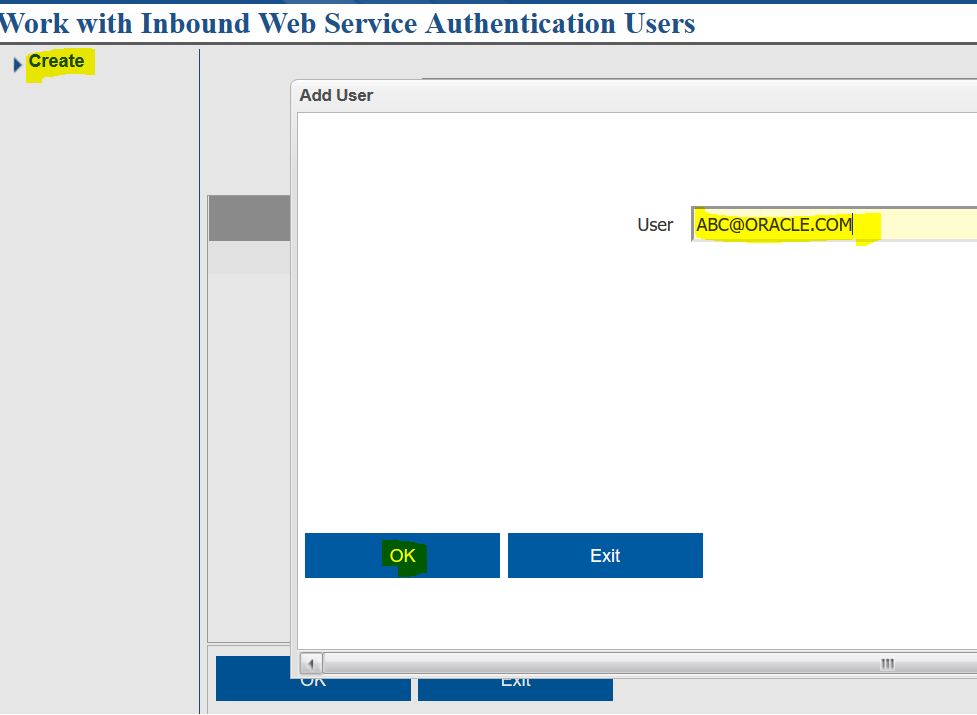
Click on Authentication : 


Add your user here !

Ref : https://support.oracle.com/epmos/faces/SearchDocDisplay?_adf.ctrl-state=g9uip4sox_4&_afrLoop=475460742941022#FIX

Next :

Fast Path : IJCT   -> Hit enter


Step 2 :

Search for INV_INQURY


Change and set it up as :


Click on more -> Work with Queues.


Create


Set It up as :


Step 3 :

Now as everything is set up in OMS we need to work on the API :

API :  CWMessageIn

URL : https://<serverl_URL>/SerenadeSeam/sxrs/SerenadeREST/CWMessageIn

Make sure the Target here is the Inbound Job Name

Body :

<Message source="CWIntegrate" target="INV_INQUR2" type="CWINVENTORYINQUIRY" > <InventoryInquiry company="51" item_number="AB1001" /> </Message>

Authorization : Basic


Step 4 :

URL : https://<server_URL>/SerenadeSeam/sxrs/jms/getFromQueue

Body :

{ "queueName": "INV_INQURY_OUT" }

Authorization : Basic

Here Queue name is the Outbound queue that is mentioned while setting up in IJCT.


You have the XML response in the message section of the JSON !!

Tuesday, October 22, 2019

Oracle RMS Customer Order Fulfilment API


Creating Customer Order Fulfillment in Oracle Retail Merchandising Cloud (RMS)


Oracle has exposed SOAP Web Service to Create an order fulfillment in RMS :

URL : https://<<YOUR_SERVER_URL>>/FulfillOrderBean/FulfillOrderService?wsdl


Sample Payload Request :

    <v1:createFulfilOrdColDesc>
         <!--Optional:-->
         <FulfilOrdColDesc xsi:schemaLocation="http://www.oracle.com/retail/integration/base/bo/FulfilOrdColDesc/v1 http://www.oracle.com/retail/integration/base/bo/FulfilOrdColDesc/v1/FulfilOrdColDesc.xsd " xmlns="http://www.oracle.com/retail/integration/base/bo/FulfilOrdColDesc/v1" xmlns:xsi="http://www.w3.org/2001/XMLSchema-instance">
            <collection_size>4</collection_size>
            <ns1:FulfilOrdDesc xmlns:ns1="http://www.oracle.com/retail/integration/base/bo/FulfilOrdDesc/v1">
               <ns1:consumer_delivery_date>2013-09-01T09:08:07</ns1:consumer_delivery_date>
               <ns1:customer_order_no>13</ns1:customer_order_no>
               <ns1:fulfill_order_no>13</ns1:fulfill_order_no>
               <ns1:source_loc_type>WH</ns1:source_loc_type>
               <ns1:source_loc_id>99990</ns1:source_loc_id>
               <ns1:fulfill_loc_type>S</ns1:fulfill_loc_type>
               <ns1:fulfill_loc_id>17</ns1:fulfill_loc_id>
               <ns1:partial_delivery_ind>N</ns1:partial_delivery_ind>
               <ns1:delivery_type>S</ns1:delivery_type>
               <ns1:delivery_charges>20.4</ns1:delivery_charges>
               <ns1:delivery_charges_curr>USD</ns1:delivery_charges_curr>
               <ns1:comments>Test</ns1:comments>
               <ns2:FulfilOrdCustDesc xmlns:ns2="http://www.oracle.com/retail/integration/base/bo/FulfilOrdCustDesc/v1">
                  <ns2:customer_no>55006</ns2:customer_no>
                  <ns2:deliver_first_name>Andrewq</ns2:deliver_first_name>
                  <ns2:deliver_last_name>Josephq</ns2:deliver_last_name>
                  <ns2:deliver_add1>High Street</ns2:deliver_add1>
                  <ns2:deliver_city>Ontario</ns2:deliver_city>
                  <ns2:deliver_state>LA</ns2:deliver_state>
                  <ns2:deliver_country_id>US</ns2:deliver_country_id>
                  <ns2:deliver_phone>23112</ns2:deliver_phone>
                  <ns2:bill_first_name>Andrew</ns2:bill_first_name>
                  <ns2:bill_last_name>Joseph</ns2:bill_last_name>
                  <ns2:bill_add1>High street</ns2:bill_add1>
                  <ns2:bill_city>Ontario</ns2:bill_city>
                  <ns2:bill_state>NY</ns2:bill_state>
                  <ns2:bill_country_id>US</ns2:bill_country_id>
               </ns2:FulfilOrdCustDesc>
               <ns8:FulfilOrdDtl xmlns:ns8="http://www.oracle.com/retail/integration/base/bo/FulfilOrdDtl/v1">
                  <ns8:item>18CHAMOMILE</ns8:item>
                  <ns8:ref_item/>
                  <ns8:order_qty_suom>20</ns8:order_qty_suom>
                  <ns8:standard_uom>EA</ns8:standard_uom>
                  <ns8:transaction_uom>EA</ns8:transaction_uom>
                  <ns8:substitute_ind>N</ns8:substitute_ind>
                  <ns8:unit_retail>20.4</ns8:unit_retail>
                  <ns8:retail_curr>CAD</ns8:retail_curr>
                  <ns8:comments>testing</ns8:comments>
               </ns8:FulfilOrdDtl>
            </ns1:FulfilOrdDesc>
         </FulfilOrdColDesc>
      </v1:createFulfilOrdColDesc>


Response :

  <ns1:createFulfilOrdColDescResponse xmlns:ns1="http://www.oracle.com/retail/rms/integration/services/FulfillOrderService/v1" xmlns:ns16="http://www.oracle.com/retail/integration/base/bo/FulfilOrdCfmCol/v1" xmlns:ns6="http://www.oracle.com/retail/integration/base/bo/FulfilOrdColDesc/v1" xmlns:ns2="http://www.oracle.com/retail/integration/base/bo/FulfilOrdColRef/v1" xmlns:ns5="http://www.oracle.com/retail/integration/base/bo/InvocationSuccess/v1" xmlns:ns17="http://www.oracle.com/retail/integration/base/bo/FulfilOrdCfmDesc/v1" xmlns:ns18="http://www.oracle.com/retail/integration/base/bo/FulfilOrdCfmDtl/v1" xmlns:ns7="http://www.oracle.com/retail/integration/base/bo/FulfilOrdDesc/v1" xmlns:ns8="http://www.oracle.com/retail/integration/base/bo/CustFlexAttriVo/v1" xmlns:ns9="http://www.oracle.com/retail/integration/base/bo/FulfilOrdCustDesc/v1" xmlns:ns10="http://www.oracle.com/retail/integration/base/bo/LocOfFulfilOrdCustDesc/v1" xmlns:ns11="http://www.oracle.com/retail/integration/localization/bo/BrFulfilOrdCustDesc/v1" xmlns:ns12="http://www.oracle.com/retail/integration/localization/bo/BrFulfilOrdPmtDesc/v1" xmlns:ns13="http://www.oracle.com/retail/integration/custom/bo/EOfBrFulfilOrdPmtDesc/v1" xmlns:ns14="http://www.oracle.com/retail/integration/custom/bo/EOfBrFulfilOrdCustDesc/v1" xmlns:ns15="http://www.oracle.com/retail/integration/base/bo/FulfilOrdDtl/v1" xmlns:ns3="http://www.oracle.com/retail/integration/base/bo/FulfilOrdRef/v1" xmlns:ns4="http://www.oracle.com/retail/integration/base/bo/FulfilOrdDtlRef/v1">
         <ns16:FulfilOrdCfmCol>
            <ns16:collection_size>1</ns16:collection_size>
            <ns17:FulfilOrdCfmDesc>
               <ns17:customer_order_no>13</ns17:customer_order_no>
               <ns17:fulfill_order_no>13</ns17:fulfill_order_no>
               <ns17:confirm_type>C</ns17:confirm_type>
               <ns17:confirm_no>100000015005</ns17:confirm_no>
               <ns18:FulfilOrdCfmDtl>
                  <ns18:item>18CHAMOMILE</ns18:item>
                  <ns18:confirm_qty>20</ns18:confirm_qty>
                  <ns18:confirm_qty_uom>EA</ns18:confirm_qty_uom>
               </ns18:FulfilOrdCfmDtl>
               <ns17:fulfill_loc_id>17</ns17:fulfill_loc_id>
               <ns17:system_cd>MRCH-COMP</ns17:system_cd>
            </ns17:FulfilOrdCfmDesc>
         </ns16:FulfilOrdCfmCol>
      </ns1:createFulfilOrdColDescResponse>


For Validation you can check in following tables :

Tables :

select * from tsfhead where tsf_no='100000015005'; 
select * from tsfdetail where tsf_no='100000015005';

select * from ORDCUST_DETAIL order by CREATE_DATETIME desc ;          


****************************************************************************

Oracle OIC Email Notification Template

 Oracle HTML template for email notification <html> <body style="margin: 0px; background-color: rgb(226, 229, 232);"> ...