Wednesday, March 6, 2019

Using WAIT/Delay/Sleep in OSB Code


Using WAIT/Delay/Sleep in OSB Code


In Oracle Service Bus 12C, wait activity is not supported by and hence we will be using a piece of java code , which will be basically make the thread to sleep for certain milliseconds passed to the method.


Step 1 :- Download the JAR


Piece of Java Callout : 
********************
Will attach the link to the JAR file that you need to import in your Jdev / Please comment in case you need it.
********************

package threadsleep;

public class Threadsleep {
    
    public static String  sleepthreadmilis(int timer){
        try{
            Thread.sleep(timer);
        }
        catch(InterruptedException ex)
        {
            Thread.currentThread().interrupt();
        }
    return "Success";
    }

public static void main(String args[]) {
    String a="Call the method for testing";
    
       a=sleepthreadmilis(2000);
   System.out.println(a)  ;
    
}
}

Step 2 : Import the JAR

Now i will be using it in my OSB project using java callout.

Copy and paste the JAR file in any of your project folder.


Step 3 : Refresh the Artifacts in Jdeveloper :


Step 4 : Add Java callout activity in the pipeline.


**Have upload new jar (earlier it was threadsleepjar now it is archive1 )


Step 5 : Choose the Jar File 


Step 6 - Choose the Method 


Step 7 - Set the Parameters : 

Arguments int : set the delay time in milliseconds - here we are using 2 mins -> 120000 ms


Saturday, February 23, 2019

Deploying Angular app to Weblogic 12c server

Angular  apps can be deployed in Weblogic server as well .

My use case was to use weblogic server for hosting the angular app as pet the need of my organisation.

Prerequisite :


  • Weblogic Server
  • Angular application
  • WEB-INF Files

Step 1: Create an angular application (here i have named it as angularapp1)


After you create you will see these files on the path :


Step 2 : Build your angular application with production mode .


 After build you would see dist folder which contains the files for production !


Step 3 : Create a WEB-INF Folder and create two files in it .


web.xml :


<?xml version="1.0" encoding="UTF-8"?>
<web-app xmlns:xsi="http://www.w3.org/2001/XMLSchema-instance" xmlns="http://java.sun.com/xml/ns/javaee" xmlns:web="http://java.sun.com/xml/ns/javaee/web-app_2_5.xsd" xsi:schemaLocation="http://java.sun.com/xml/ns/javaee http://java.sun.com/xml/ns/javaee/web-app_2_5.xsd" id="WebApp_ID" version="2.5">
    <display-name>Portal</display-name>
    <welcome-file-list>
        <welcome-file>index.html</welcome-file>
    </welcome-file-list>
</web-app>

<!-- This should be your  file which you will be referred to index.html on angular application -->


weblogic.xml


<?xml version="1.0" encoding="UTF-8"?>
<weblogic-web-app xmlns="http://www.bea.com/ns/weblogic/weblogic-web-app">
 <context-root>/</context-root>
</weblogic-web-app>


<!-- This contains the home / root path  -->


Step 4 : Once we are ready with the files , transfer the production folder to target server where you want to deploy, here i have started local weblogic server , hence i dont need to move the files.


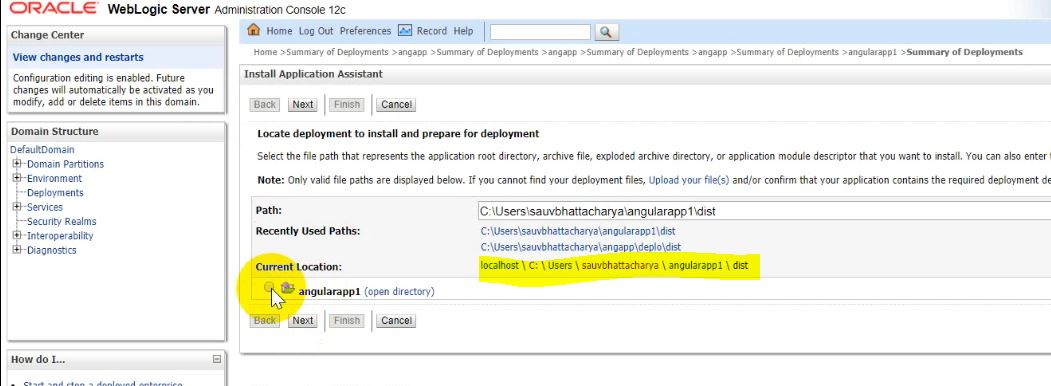
Step 5 : Open weblogic console . -> Deployments -> Install -> Select the folder which contain the WEB-INF folder  and index.html which gets generated by angular application.


Step 6: Save the configuration as shown in the screen shot.


Step 7 : Now since it is deployed , we need to start serving app. go to -> Control-> Select your app -> Servicing all requests


Step 8 :

Go to Testing-> Default and try hitting the URL generated .


We are able to route to the angular application with the server URL now !!


In my example i am using (if no path specified route to the AppComponent), you can add paths and routes , which should work fine !


Code : https://github.com/sauvik8/sauvik-public/blob/master/angularapp1.zip

Let me know in case you need the files ! will upload in drive and share !

Accessing JMS Queue targeted in OSB Cluster from SOA Cluster (BPEL)


Accessing JMS Queue targeted in OSB Cluster from SOA Cluster (BPEL)


I had a use case where in weblogic server, JMS Queues were targeted to OSB cluster and we were not able to access the queues from SOA (BPEL) integration with the connection factory in between.

I found a way around which will help our BPEL service to subscribe a JMS Queue even if it is not targeted to SOA Cluster.


- > Just add the connection factory JNDi in JMS Adapter that it !

Oracle OIC Email Notification Template

 Oracle HTML template for email notification <html> <body style="margin: 0px; background-color: rgb(226, 229, 232);"> ...